Capstone Template: Mission → Models → Outputs

Module 6: Capstone Integration

This notebook is a template you can reuse to build a portfolio‑grade capstone.

What you’ll learn

  • What a “capstone deliverable” looks like (outputs, plots, README)
  • How to break a capstone into modules (trajectory, propulsion, human factors, policy)
  • How to make a capstone narrated and teachable (not just code)

Goal

When someone opens your capstone, they should instantly see: - What mission is this? - What assumptions are you making? - What results did you get? - What should I try next?

Code
import numpy as np
import pandas as pd
import matplotlib.pyplot as plt
from IPython.display import display
from matplotlib.patches import FancyArrowPatch, Rectangle

plt.style.use("dark_background")
plt.rcParams.update(
    {
        "figure.dpi": 110,
        "axes.titlesize": 14,
        "axes.labelsize": 12,
        "xtick.labelsize": 10,
        "ytick.labelsize": 10,
        "legend.fontsize": 10,
    }
)

ACCENT = "#00d4ff"
DANGER = "#ff4d6d"
GOOD = "#7CFC00"
MUTED = "#c77dff"
WARN = "#ffd166"

print("Template ready. Fill in the mission definition and start building outputs.")
Template ready. Fill in the mission definition and start building outputs.

1) Define the mission in one screen

Your mission definition should fit on one screen and include: - Mission type (LEO / GEO / Lunar / Mars transfer) - Agency context (NASA / ESA / Roscosmos / JAXA / CNSA / ISRO examples) - Primary objective (what “success” means) - Key constraints (delta-v, mass, max g, policy constraints)

We’ll store this as a Python dict so it’s version‑controlled and easy to edit.

Code
MISSION = {
    "name": "Lunar cargo lander (template)",
    "agency_context": "Examples: NASA CLPS, JAXA SLIM, CNSA Chang'e (varies by mission).",
    "objective": "Deliver payload to the lunar surface.",
    "crewed": False,
    "payload_kg": 3000,
    "max_g": 8.0,
    "policy_notes": "Spectrum + debris + planetary protection considerations (mission-dependent).",
    "assumptions": [
        "2-body patched conics (simplified)",
        "No plane change budgeted (simplified)",
        "Single vehicle story (staging/refuel details omitted here)",
    ],
}

df = pd.DataFrame({"field": list(MISSION.keys()), "value": list(MISSION.values())})
display(df)
field value
0 name Lunar cargo lander (template)
1 agency_context Examples: NASA CLPS, JAXA SLIM, CNSA Chang'e (...
2 objective Deliver payload to the lunar surface.
3 crewed False
4 payload_kg 3000
5 max_g 8.0
6 policy_notes Spectrum + debris + planetary protection consi...
7 assumptions [2-body patched conics (simplified), No plane ...

2) Define the deliverables (what you will show)

A capstone is not “a script that runs.” It’s a small package of outputs:

  • A short README (what it is + how to run + what to try)
  • A mission summary table (delta-v, time, mass)
  • A few key plots (trajectory, budgets, constraints)
  • A clear next step (change a parameter and rerun)

Let’s define the outputs explicitly.

Code
DELIVERABLES = [
    {"artifact": "README.md", "purpose": "Explain the mission, how to run, and what to try next."},
    {"artifact": "mission_summary.csv", "purpose": "Table of phases: delta-v, time, mass, notes."},
    {"artifact": "plots/trajectory.png", "purpose": "Visual story of the mission geometry."},
    {"artifact": "plots/budgets.png", "purpose": "Delta-v + mass budget visualization."},
    {"artifact": "plots/constraints.png", "purpose": "Human factors + policy constraints (if applicable)."},
]

display(pd.DataFrame(DELIVERABLES))
artifact purpose
0 README.md Explain the mission, how to run, and what to t...
1 mission_summary.csv Table of phases: delta-v, time, mass, notes.
2 plots/trajectory.png Visual story of the mission geometry.
3 plots/budgets.png Delta-v + mass budget visualization.
4 plots/constraints.png Human factors + policy constraints (if applica...

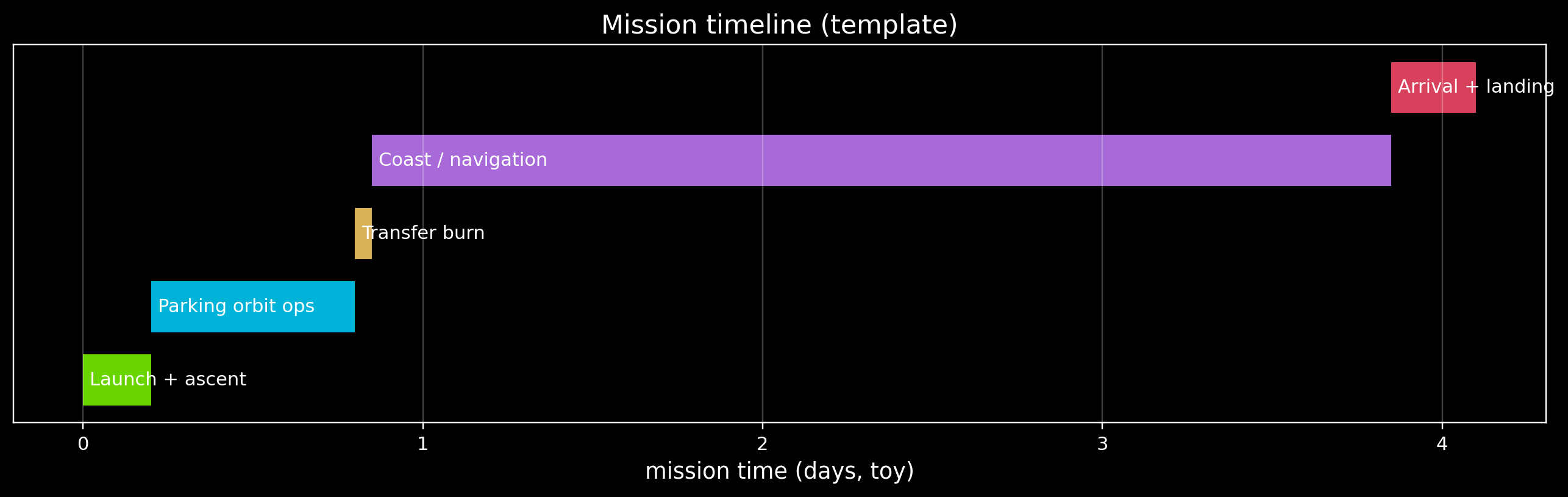
3) Mission timeline (visual)

A capstone feels real when it has a phase timeline.

Even if your physics is simplified, the story should be clear: - launch → parking orbit → transfer → arrival → landing

We’ll draw a simple timeline you can customize.

Code
# Timeline in "mission days" (illustrative)
phases = [
    {"name": "Launch + ascent", "start": 0.0, "duration": 0.2, "color": GOOD},
    {"name": "Parking orbit ops", "start": 0.2, "duration": 0.6, "color": ACCENT},
    {"name": "Transfer burn", "start": 0.8, "duration": 0.05, "color": WARN},
    {"name": "Coast / navigation", "start": 0.85, "duration": 3.0, "color": MUTED},
    {"name": "Arrival + landing", "start": 3.85, "duration": 0.25, "color": DANGER},
]

fig, ax = plt.subplots(figsize=(12, 3.8))

y_positions = np.arange(len(phases))
for i, p in enumerate(phases):
    ax.broken_barh([(p["start"], p["duration"])], (i - 0.35, 0.7), facecolors=p["color"], alpha=0.85)
    ax.text(p["start"] + 0.02, i, p["name"], va="center")

ax.set_yticks([])
ax.set_xlabel("mission time (days, toy)")
ax.set_title("Mission timeline (template)")
ax.grid(True, axis="x", alpha=0.25)

plt.tight_layout()
plt.show()

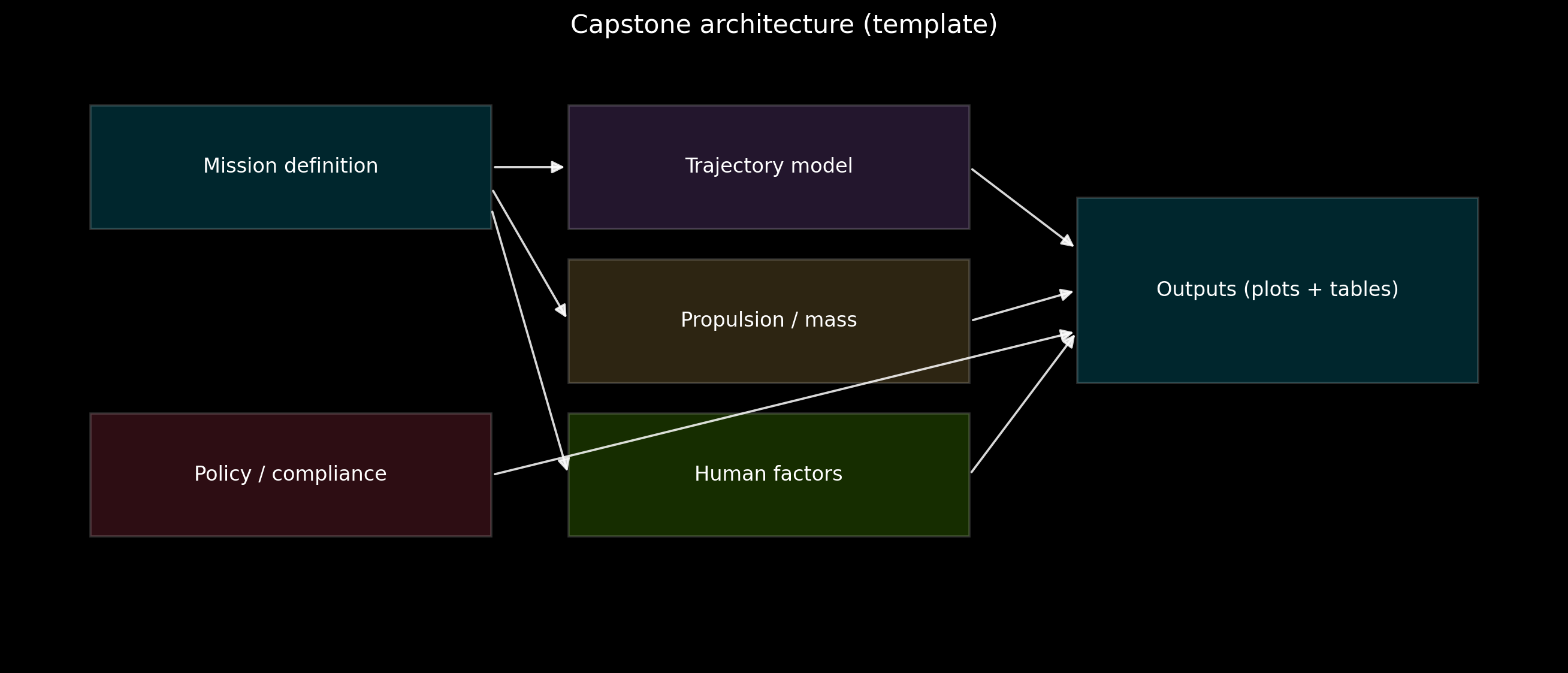
4) Architecture diagram (how pieces connect)

A capstone usually combines multiple models.

The trick is to make the structure obvious: - inputs → models → outputs

We’ll draw a simple block diagram.

Code
def draw_box(ax, xy, w, h, label, color):
    x, y = xy
    rect = Rectangle((x, y), w, h, facecolor=color, edgecolor="white", alpha=0.18, linewidth=1.2)
    ax.add_patch(rect)
    ax.text(x + w / 2, y + h / 2, label, ha="center", va="center", fontsize=11)


def draw_arrow(ax, start, end):
    arr = FancyArrowPatch(start, end, arrowstyle="-|>", mutation_scale=14, linewidth=1.2, color="white", alpha=0.85)
    ax.add_patch(arr)


fig, ax = plt.subplots(figsize=(12, 5.2))
ax.set_xlim(0, 10)
ax.set_ylim(0, 6)
ax.axis("off")

# Boxes
boxes = {
    "Mission definition": ((0.5, 4.2), 2.6, 1.2, ACCENT),
    "Trajectory model": ((3.6, 4.2), 2.6, 1.2, MUTED),
    "Propulsion / mass": ((3.6, 2.7), 2.6, 1.2, WARN),
    "Human factors": ((3.6, 1.2), 2.6, 1.2, GOOD),
    "Policy / compliance": ((0.5, 1.2), 2.6, 1.2, DANGER),
    "Outputs (plots + tables)": ((6.9, 2.7), 2.6, 1.8, ACCENT),
}

for label, (xy, w, h, c) in boxes.items():
    draw_box(ax, xy, w, h, label, c)

# Arrows
# Mission definition to models

draw_arrow(ax, (3.1, 4.8), (3.6, 4.8))
draw_arrow(ax, (3.1, 4.6), (3.6, 3.3))
draw_arrow(ax, (3.1, 4.4), (3.6, 1.8))

# Policy to outputs (constraints)
draw_arrow(ax, (3.1, 1.8), (6.9, 3.2))

# Models to outputs

draw_arrow(ax, (6.2, 4.8), (6.9, 4.0))
draw_arrow(ax, (6.2, 3.3), (6.9, 3.6))
draw_arrow(ax, (6.2, 1.8), (6.9, 3.2))

ax.set_title("Capstone architecture (template)")
plt.tight_layout()
plt.show()
5) Validation checklist (don’t skip this)

A capstone becomes credible when you show sanity checks.

Examples: - Orders of magnitude: Is Earth→Mars transfer time “months”, not “hours”? - Units: Are you mixing km and m? - Known reference numbers: Is LEO orbital speed ~7.8 km/s? - Budget closure: Do your phase delta-v values sum to the total you claim?

We’ll store a simple checklist you can fill in as you build.

Code
CHECKLIST = [
    {"check": "Units are consistent (m vs km, s vs day)", "status": "TODO"},
    {"check": "Total delta-v equals sum of phase deltas", "status": "TODO"},
    {"check": "Time-of-flight is plausible (order of magnitude)", "status": "TODO"},
    {"check": "Mass model is plausible (dry/payload/prop fractions)", "status": "TODO"},
    {"check": "Plots have labeled axes + units", "status": "TODO"},
    {"check": "README explains next step in <3 seconds", "status": "TODO"},
]

display(pd.DataFrame(CHECKLIST))
check status
0 Units are consistent (m vs km, s vs day) TODO
1 Total delta-v equals sum of phase deltas TODO
2 Time-of-flight is plausible (order of magnitude) TODO
3 Mass model is plausible (dry/payload/prop frac... TODO
4 Plots have labeled axes + units TODO
5 README explains next step in <3 seconds TODO

6) What can I do next?

  • Pick your mission (LEO / GEO / Lunar / Mars) and rewrite the MISSION dict until it’s crisp.
  • Update the phase list in the timeline until the story is coherent.
  • Then move from “template” to “project”:
    • Create src/Module_06_Capstone/Projects/Capstone_Mission/
    • Put a small run.py in it that generates the summary table + plots

Best practice: keep your first version simple and runnable. Add realism in later iterations.